How I failed story-validators-race (EP5)
Hey there! I wanted to share my experience completing Task 1 of the Story Validator Race. The rewards for finishing all four tasks are…

Hey there! I wanted to share my experience completing Task 1 of the Story Validator Race. The rewards for finishing all four tasks are pretty cool — 1,300 IP plus a daily faucet of 3 IP!
Update Sep 10, 2024
TLDR;
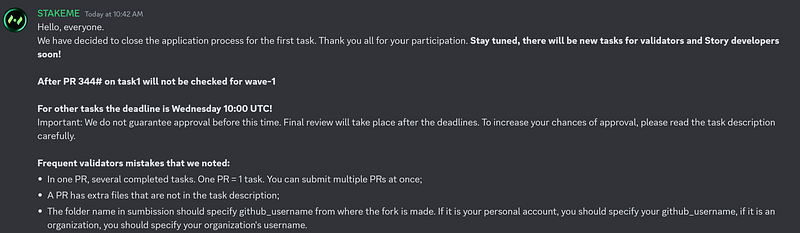
- The current wave has closed.
- Continue reading to see how I failed or to learn how GitHub works.
- Please wait for the next wave if you want to participate.
- Submissions made now will not be counted.
I have to admit, I almost gave up when I realized the project required staking 1,024 $IP, and participants were scrambling to get on the active list using all kinds of creative methods and tools. Some created multiple wallets, switched their devices’ airplane mode on and off to manually collect faucets, while others resorted to using fingerprint browsers, Tor, proxies, VPNs, and even automated Python scripts with Geth. Ironically, all these efforts ended up hurting the network’s uptime, which was frustrating. But I understand it’s a temporary measure to slow down the influx of new inactive validators.
Then I thought, why not push through? I was already halfway there, and quitting at that point felt like a waste. At least if I look back, I won’t feel regret for not trying. So, I decided to stick with it and tackle Task 1 step-by-step. Let’s keep going!
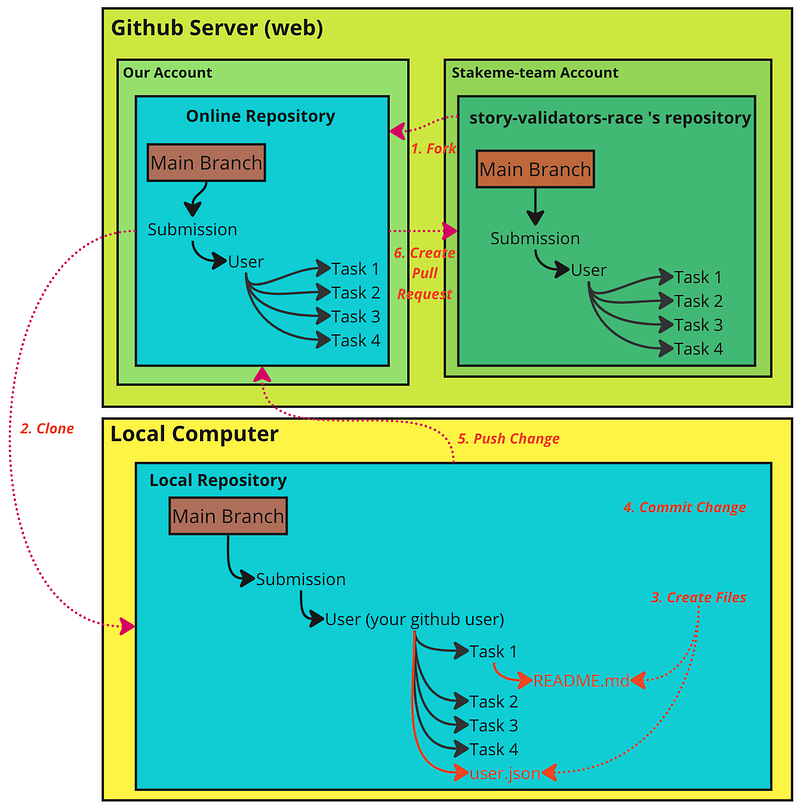
1. Fork the Repository
I started by forking the story-validators-race repository to my GitHub account. This created a personal copy of the project for making changes.

url: https://github.com/stakeme-team/story-validators-race
Click at the Form button (top right) drop down list, then, click + Create a new fork.
2. Clone the Repository
I am using Ubuntu, I cloned the forked repository to my local machine with:
#Replace "pokoblue" with your user name

git clone https://github.com/pokoblue/story-validators-race.git
cd story-validators-race
3. Create Files
I created the submissions/pokoblue directory and created two files. It's important to replace 'pokoblue' with your own username. If you see 'pokoblue' anywhere in the code, make sure to replace it with your username.
#Create directory - replace folder name "pokoblue" with your username
mkdir -p submissions/pokoblue/task1

#create user.json file
nano submissions/pokoblue/user.json
I’m using nano to create the file. Inside, I specify the Discord name, ID, and GitHub username, replacing the placeholders with my own information. Then, I save the file.
{
  "github_username": "pokoblue",
  "discord_id": "609320577446051880",
  "discord_username": "pokoblue"
}
Next, create README.md
#create READMEME.md file
nano submissions/pokoblue/task1/user.json
Inside nano, specify the details you want to include in the file. Write the content that best conveys your message. I suggest checking out submissions from others who have successfully completed the task.
I tried my own version before, but unfortunately, it didn’t pass. If you want to succeed, aim to make your submission even better than mine. Be clear and concise, and provide all necessary information. See my sample below.
# PokoBlue Profile

## Experience

### IRL & General
- Over 30 years in programming: Assembly, BASIC, C++, Delphi, Java, Full Stack Web, Python, Solidity.
- 15 years of experience in Enterprise Architecture, Data Governance, Data Management, and IT Strategy Planning.
- Passionate traveler, sports enthusiast, and family-oriented.

### On-Chain Experience
- **Validator/Node Operations:**
  - 0G, Fuel, Farcaster
  - Gala - Common Ground World (11 nodes), LE (1 node)
  - Wardend, Allora

### Social Profile
- [Medium](https://medium.com/@huicomm)
- [X (Twitter)](https://x.com/PokoBlue99)

## Server Specifications (Dedicated Server)

### Server 1
- **CPU:** 2x X99 Xeon, 32 Cores, 64 Threads
- **RAM:** 256GB DDR4
- **Storage:** 2 x 1TB NVMe SSD
- **Network:** 1Gbps Ethernet
- **Internet Connection:** 2 Gbps Download / 1 Gbps Upload
- **Location:** Southeast Asia, Thailand

### Server 2
- **Provider:** Digital Ocean
- **CPU:** 8 vCPU
- **RAM:** 32 GiB
- **Storage:** 200 GiB+
- **Transfer:** 6000 GiB
- **Scalable:** Yes, everything here is scalable.
- **Use Case:** VPN Server (split tunnel config), Reverse Proxy Server, etc.
4. Commit the Change
I added the files and committed the changes locally:
git add submissions/pokoblue/*
git commit -m "Pokoblue - Add Task 1 submission"
If you get issues with password authentication in command line, you can check out this video. https://www.youtube.com/watch?v=iLrywUfs7yU.
5. Push Changes
Pushed the committed changes back to my forked repository.
git push origin main6. Create Pull Request
Finally, I created a pull request from my repository to the stakeme-team repository to submit my Task 1 changes for review.
Important: You must create the pull request from your repository, not directly on the “stakeme-team” repository. I tried doing it on the “stakeme-team” side and found it wasn’t possible. Follow the steps and screenshots below to ensure you’re creating the pull request correctly from your forked repository.
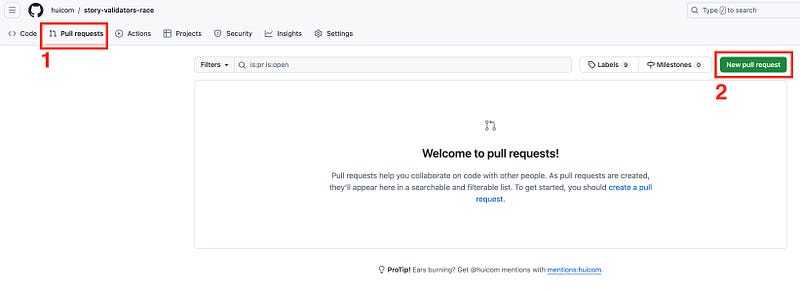
- Click pull requests
- Click New pull reqeust button
Then, you should see something like this:
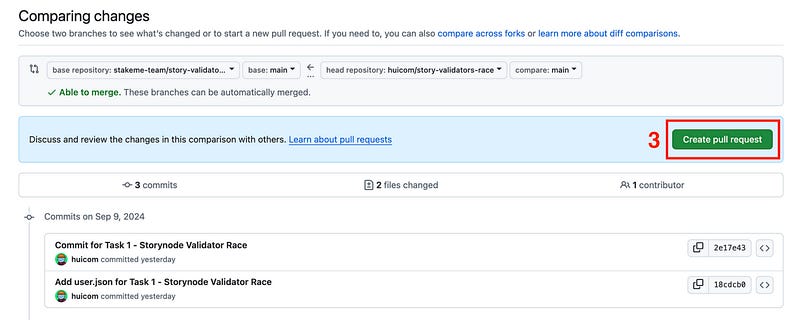
3. Click “Create pull request” button
4. Fill information about the request
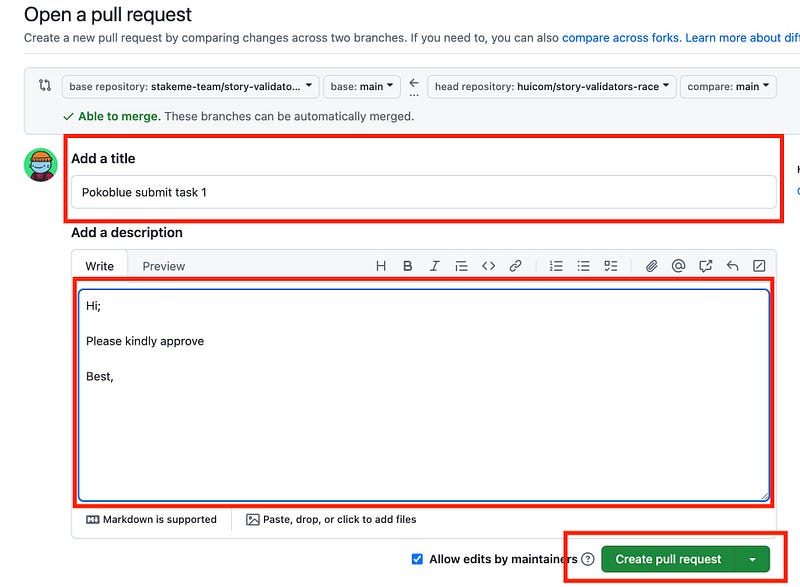
At this step, you can wait for approval.
Checking your result
url: https://github.com/stakeme-team/story-validators-race/pulls
On this page, you’ll find a list of all pull requests, including comments or approval statuses. In my case, it took about 8 hours to get the result.
Remember, do not submit Task 2 until you receive approval for Task 1; otherwise, you might be asked to delete and resubmit Task 1.
Good luck!
Thanks for reading!